How to prepare a coach hire quote: a worked school-trip example
By the Netfleet team · JOPA Studio
A school asks for a coach for the day. Before proposing a price, turn the request into a defined service: how many passengers, which itinerary and how long will the coach and driver be needed? This example walks through preparing that quote.
The initial request
- 40 passengers in total, including accompanying adults; a 49-seat coach.
- A one-day trip in Belgium, leaving the depot at 08:00 and returning to the depot at 16:00.
- 200 km in total, including empty journeys to and from the depot; 8 hours of vehicle availability.
- One driver assumed for this example, no overnight stay; €30 budgeted for parking.
Fictional teaching example. Distances, times, rates and the VAT percentage are calculation assumptions, not recommended market prices or a tax or regulatory assessment.
1. Complete the brief before calculating
A return journey between two towns does not fully define the work. Confirm these details with the school, then add the journeys and timings required by your own operation.
- Date, exact pickup and return addresses, intermediate stops and requested times.
- Total passenger count, accompanying adults, luggage and accessibility requirements.
- Availability at the destination: does the coach wait for the group or return to the depot?
- Coach access and parking, necessary reservations and associated charges.
- Responsible contact, billing details and what the service includes.
2. Build the price from the costs
The table uses Netfleet’s cost engine with the assumptions below. The mileage rate here represents vehicle costs excluding fuel and the driver; availability time is an additional charge. If your own rates already bundle these costs, adjust the settings to avoid counting them twice.
| Item | Example calculation | Amount |
|---|---|---|
| Coach — distance | 200 km × €1.35 | €270.00 |
| Coach — availability | 8 hours × €42 | €336.00 |
| Fuel | 200 km × 28 L/100 km × €1.75/L | €98.00 |
| Driver | 1 driver × 8 hours × €30 | €240.00 |
| Daily allowance | 1 day × €45 | €45.00 |
| Parking | Example flat amount | €30.00 |
| Included costs | €1,019.00 | |
| 18% markup on costs | €183.42 | |
| Price excluding VAT | €1,202.42 | |
| VAT — assumed 6% | €72.15 | |
| Example total | €1,274.57 | |
The markup is calculated on costs: it is not an 18% margin on the selling price. No tolls, access charges, ferry or accommodation are included here; add the items applicable to your journey. The VAT percentage only illustrates the arithmetic: check the treatment applicable to the actual service.
3. Check the journey and availability
The 8 hours above describe the service, not 8 hours of driving. Enter driving times separately and check breaks, duty duration, rest and the driver’s preceding schedule. Assuming one driver in this example is not a compliance verdict.
Check addresses, coach access and empty mileage. A route estimate does not confirm that a parking space is available or access is permitted. Check vehicle maintenance, absences and other assignments before confirming the service.
4. Prepare the quote in Netfleet
- Create the customer and select the coach and its vehicle class. Review the cost settings before reusing them for your quotes.
- Enter the legs, dates and times. Use route calculation when configured, then review the proposed distances and durations and add trip-specific charges.
- Generate the quote, review its cost breakdown and warnings, and save it. The price should reflect the terms you are prepared to offer the school.
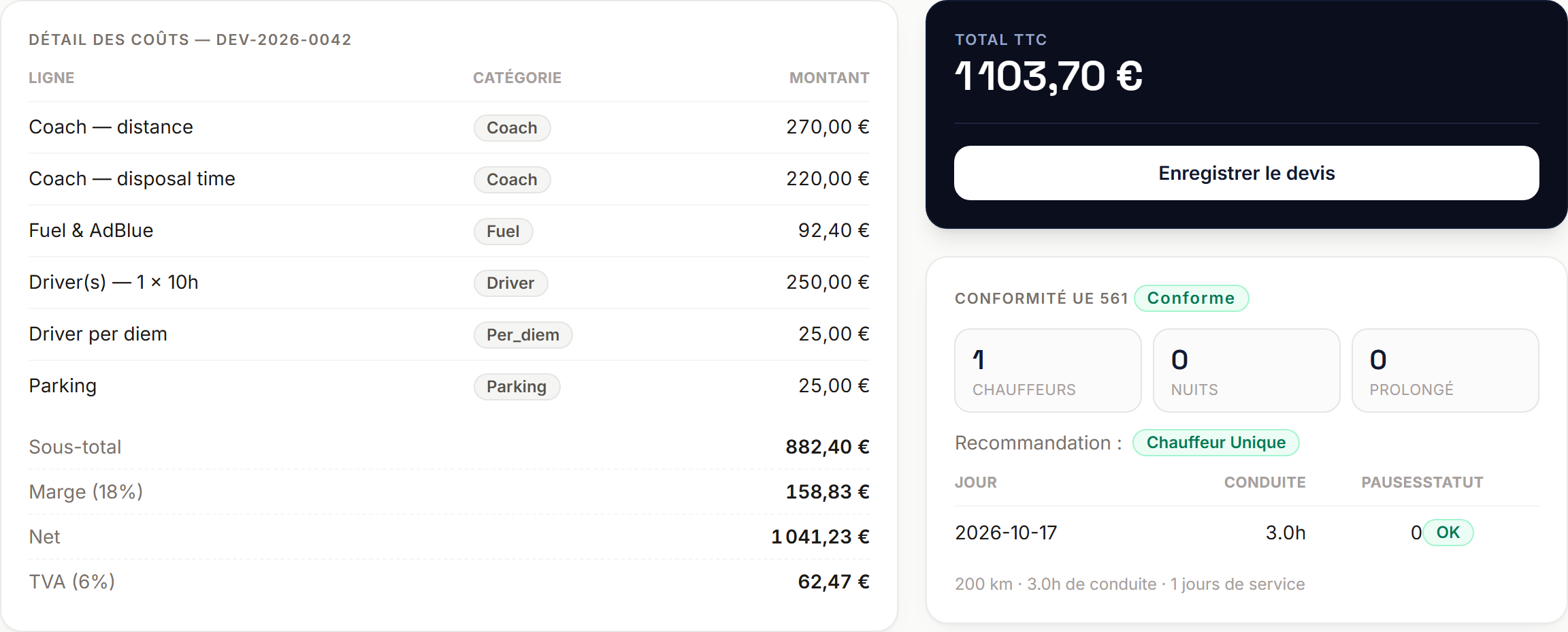
An actual Netfleet screen with a different fictional dataset, in French. The calculation for this school trip is shown in the table above.
5. Review what the school will receive
Check the customer details, passenger count, itinerary, times, total and included services. Specify the validity, payment and cancellation terms that apply to your offer.
Send the quote through your configured delivery method and check the customer link. After acceptance, prepare the vehicle and driver assignment and the run sheet. If the request changes, recalculate before confirming a revised price.
What to keep
A usable quote connects a precise request, explainable costs and a deliverable service. Keep your assumptions: they help you answer the customer and explain price changes when the timings, route or requirements change.