Coach hire quoting software
A school, association or business asks for a coach with a driver. Before you reply, you need to price the route, the work involved and your margin. Netfleet brings those inputs into a quote you review before sending to the customer.
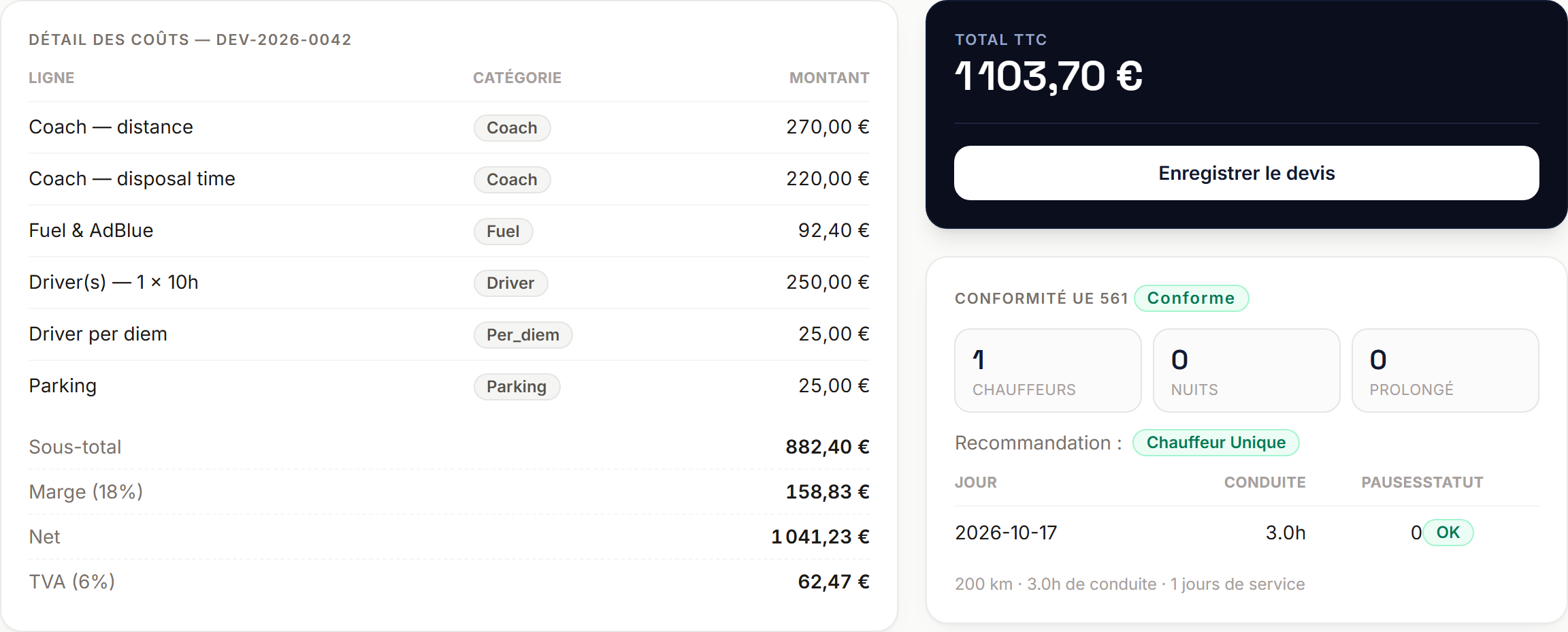
Start with the route and your own rates
Enter dates, stops and passenger numbers. Choose a vehicle class, then use your cost settings to calculate the coach, fuel and drivers. The breakdown shows how the proposed price was reached, so you can adjust assumptions before committing to an offer.
Keep margin and VAT visible
The quote separates costs, margin and VAT. For international journeys, kilometres by country feed the VAT calculation. Review the route, rates and trip-specific expenses: estimated tolls, parking or additional services may need an adjustment before the quote is ready.
Follow the quote after sending
Save the quote and send it to the customer. Keep its status, response or acceptance with the same record. When the customer accepts, prepare the trip and its scheduling. Your team keeps the connection between the offer the customer received and the journey it needs to organise.
Prepare your first quote
- The route, dates and requested times.
- Passenger numbers and vehicle class.
- Your costs, margin and any trip-specific expenses.
14 days free. No credit card or setup fee.
Frequently asked questions
Is the price sent to the customer automatically?
You review the calculation, save the quote and trigger sending. You retain the decision about the price and terms you offer.
Does the driving-time assessment replace a regulatory check?
No. It supports journey planning and estimates driver requirements. It does not replace tachograph data or checking the obligations that apply to your service.
Must I import all my customers before starting?
You can start with one quote and add customers, vehicles and drivers gradually. The trial includes demonstration data so you can explore the workflow.